


Ultimate Guitar: Chords & Tabs
4.270.27K Reviews
App Specs
- Version
- 7.3.25
- Updated On
- License
- Free
- Downloads
- 10,000,000+
- Developer
- Ultimate Guitar USA LLC
- Categories
- Music & Audio
- Platform
- Android, iOS
Screenshots


 Analysis by AppCompare
When I reach for a song during practice, I want to get from a vague idea—“that chorus I heard yesterday”—to something I can actually play without losing the mood. Ultimate Guitar: Chords & Tabs is built for that kind of moment: it gathers arrangements for several instruments and gives me a place to search, compare versions, and work through a part at my own pace. It is a music and audio app from Ultimate Guitar USA LLC, and its scale is a real part of the appeal: the challenge is less finding something to try than choosing a version that suits my instrument and current ability.
How quickly can I get to the useful part?
For a familiar song, the basic workflow is direct: search for the title, open a result, and check whether its arrangement looks playable before settling in. I like that this turns the app into a practical reference rather than something I have to browse aimlessly. When I have a guitar in my hands, fewer steps between remembering a riff and testing it matter more than a busy home screen or a long list of recommendations.
That speed depends on knowing what I’m looking for. A broad search can return several versions, and the most visible result is not automatically the best fit for my level or preferred arrangement. I get better results by treating the first tab as a starting point: compare alternatives, check the tuning and chord shapes shown, then decide which one is worth practicing. This little pause can save time later, especially when a song has a distinctive rhythm or a part that is simplified in some versions.
The app is free to install, but some tools and content sit behind in-app purchases, which range from less than a dollar to a little over a hundred dollars per item. I would explore the free experience first and check what a specific feature requires before planning a practice routine around it. That way, the app’s quick access to material stays useful without assuming every learning tool is included at no cost.
What happens during a longer practice session?
A quick look-up is one thing; an extended session is where the library and playback tools become more useful. I can work on one section, repeat it, and use tempo controls or a metronome to keep the exercise focused. Rather than trying to play a whole song from the top each time, I’d pick a troublesome transition, loop that passage, and only widen the practice area once the change feels more dependable. That is a more patient workflow than simply following a scrolling tab and hoping the fingers catch up.
For a realistic everyday use, imagine having twenty minutes before meeting a friend to play. I would search for a song we both know, compare a couple of arrangements, and choose the one that leaves room for my current technique. Then I’d check the chord changes and use a short loop to rehearse the awkward move between sections. The value is not that the app magically teaches the song; it helps me spend those limited minutes on the part that actually needs attention.
It also helps to separate reference from instruction. A chord diagram can show where to put my fingers, and a tab can suggest which notes to play, but neither necessarily explains why a rhythm feels wrong or how to relax a tense hand. I use the material as a map, then listen closely and slow down my own playing when a passage does not sound right. That distinction matters for beginners: an enormous collection can offer plenty to attempt, but it does not replace feedback from a teacher or careful listening.
Worth Reading Before You Choose

Baby Panda World Brings Quick Play to Modern Phones, but Its Game Library Feels Busy

ESPN’s Live Game View Makes Following Close Games Easier

QuizzLand Review: A Good Fit for Short Trivia Breaks, Not Every Player

Basketball Stars: Multiplayer Is Fast, but Can It Recover When Matches Go Wrong?

WEBTOON Turns Phone Updates Into a Better Reading Routine

Link to Windows Runs on Shared Habits, Not Social Feeds
Stability, recovery, and practical limits
I would judge reliability by whether I can return to the song I was working on and continue without rebuilding my whole practice plan. The app’s value is strongest when I use search and saved context as a reference habit: identify the version, note the passage that needs work, and come back to it deliberately. If a tab feels confusing, switching to another arrangement is often a more useful recovery step than forcing myself through a version that does not match what I hear.
There is a trade-off in a library this broad. User-facing arrangements can differ in clarity and difficulty, so the existence of a tab is not a guarantee that it is accurate, complete, or ideal for learning. I’d compare the written part with the recording and trust my ears when the two disagree. For a beginner, that means avoiding the assumption that every chord label is the only possible choice; for an experienced player, it means treating tabs as a convenient starting point rather than a definitive transcription.
Heavy sessions can also bring decision fatigue. When several versions, instruments, and tools are available, it is tempting to keep browsing instead of practicing. My workaround is to choose a specific goal before opening the app—learn the chorus rhythm, check a bass line, or confirm a chord shape—and stop searching once I have a workable answer. That small boundary makes the collection feel like a resource rather than another distraction.
Who benefits most, and who may prefer another approach?
I think it suits players who learn songs by doing: guitarists who want chord references, more experienced players comparing arrangements, and people who switch between guitar, ukulele, and bass. It can also be useful when a group wants to agree on a workable version of a familiar tune before playing together. The range of material makes it easier to explore beyond one instrument, though each player still needs to judge whether the arrangement matches their tuning, skill, and musical taste.
If you mainly want a structured course that teaches technique in a planned sequence, a lesson-focused app or a human teacher may be a better first choice. If your main need is only a tuner or metronome, a simpler dedicated tool may feel less crowded. This app’s particular strength is the connection between finding a song and practicing its written parts; it is less compelling when you do not want a large catalog or do not enjoy learning from tabs and chord sheets.
Compared with the usual alternatives, a general web search can be faster for one isolated chord question, while a video lesson may make picking patterns and hand movement easier to see. A printed songbook is calmer and does not invite switching between results, but it cannot offer the same search across a broad collection. I prefer this app when I want multiple arrangements in one place; I would choose video or live instruction when seeing technique clearly matters more than having a quick written reference.
Device and spending considerations
The app is listed for Android and iOS, with a minimum operating-system requirement of 7.1, and its current version is 7.2.8. It has a Teen age rating. Those details make it worth checking compatibility before relying on it for practice, especially if you use an older device. I would also consider how I like to read music on a phone: tabs need enough screen space to follow comfortably, and a larger display can be easier for longer passages than repeatedly zooming or repositioning a compact screen.
I would not assume that every feature is equally useful on every device or in every practice setting. A phone is handy for checking a chord while holding a guitar, but using a tuner, a backing track, and a tab at once may make a small screen feel busy. Keeping the session focused on one task at a time—first tune, then review the part, then play—can reduce that friction. The practical question is not simply whether the app runs, but whether its layout fits the way you actually practice.
Its audience is substantial: it has an average rating of 4.3 from around 616,000 ratings, with over 10 million installs. Those figures suggest many people use it as a regular music reference, but they do not tell me whether a particular arrangement will suit my needs. I would still test the free version against a song I genuinely want to learn before deciding whether any paid option is worthwhile.
Getting Started with Ultimate Guitar
First things first, downloading the app is a breeze. Available for both Android and iOS, it’s a quick install from the respective app stores. Once you fire it up, you’re greeted with a clean and intuitive interface that doesn’t mess around. It’s straightforward, easy to navigate, and doesn’t make you jump through hoops to find what you need.
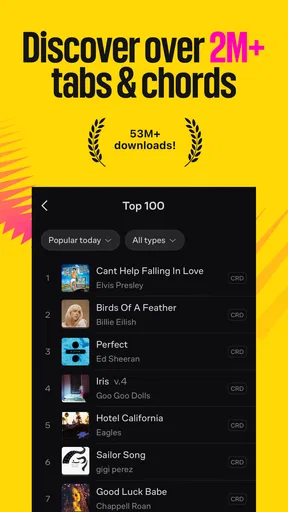
The home screen is your gateway to a world of tabs and chords. You’ve got easy access to trending tabs, personalized recommendations, and a search bar that’s just itching to find whatever song you’re in the mood to jam out to. The app supports a massive library of tabs and chords, which is continuously updated, meaning you’ll always be in the loop with the latest hits.
The Treasure Trove of Tabs
Okay, here’s where Ultimate Guitar really shines. The sheer volume of tabs and chords is staggering. Seriously, if there’s a song you want to play, chances are, it’s in here. From classic rock to the latest pop hits, it’s all covered. And it’s not just limited to guitar - you’ll find bass, ukulele, and even drum tabs to get your groove on.
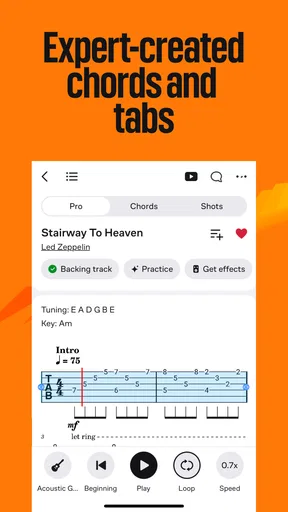
The tabs themselves are well-organized and come with interactive features that make learning a breeze. You can adjust the tempo, loop sections, and even use a built-in metronome to keep your timing spot on. Plus, the app allows you to switch between different versions of the same song, so you can choose the one that suits your skill level best.
Features That Hit the Right Notes
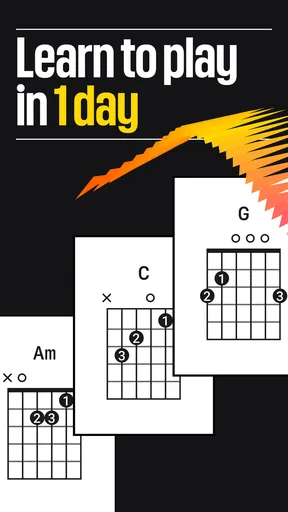
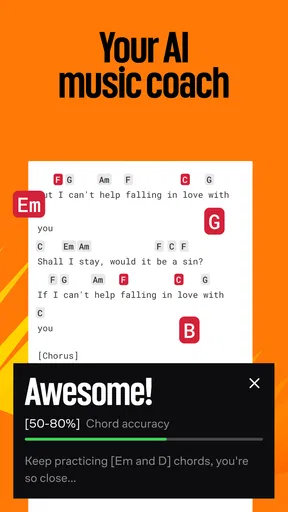
One of my favorite features has to be the interactive tab player. It’s like having a personal tutor who’s endlessly patient. You can watch and follow along as the tab scrolls automatically, making it super easy to pick up new songs. Plus, there’s a nifty chord library section where you can brush up on your chord shapes and finger positions.
If you’re into jamming with friends or just want to add some polish to your practice sessions, the app also offers a backing track feature. It’s a ton of fun and can really elevate your practice time. And for those who love to tweak their sound, there’s a built-in tuner and a set of tools for adjusting pitch and tone.
What’s the Catch?
Now, while Ultimate Guitar is a fantastic resource, it’s not without its nuances. Some features, like the interactive tab player, are locked behind a premium subscription. The free version is still incredibly robust, but if you’re looking for the full experience, you’ll need to shell out a bit of cash.
Another thing to note is that while the app is packed with features, it can feel a little overwhelming at first. With so many tabs and tools, it might take a moment to find your bearings. But once you do, it’s smooth sailing.
Wrapping It Up
At the end of the day, Ultimate Guitar: Chords & Tabs is a must-have for any guitarist. It’s packed with features that cater to all skill levels, and the massive library of tabs ensures you’ll never run out of songs to play. Whether you’re looking to learn a few new songs or dive deep into music theory, this app has got you covered.
So, if you’re ready to take your guitar skills to the next level, give Ultimate Guitar a try. It’s like having a personal guitar tutor on standby, ready to help you rock out whenever the mood strikes. Happy strumming!
Pros
- Extensive library of songs and tabs.
- User-friendly interface for easy navigation.
- Offline access to saved tabs.
- Interactive features for learning.
- Regular updates with new content.
Cons
- In-app purchases can be pricey.
- Ads can be intrusive at times.
- Some tabs lack accuracy.
- Limited features without subscription.
- Occasional app crashes reported.
FAQs for Ultimate Guitar: Chords & Tabs
What features does Ultimate Guitar: Chords & Tabs offer?
Ultimate Guitar: Chords & Tabs provides a comprehensive library of over 1.4 million guitar, ukulele, and bass tabs. It includes features like interactive chord diagrams, a tuner, and a metronome. Users can also enjoy offline access, create playlists, and engage with a community of musicians. The app caters to both beginners and advanced players.
Is Ultimate Guitar: Chords & Tabs suitable for beginners?
Yes, Ultimate Guitar: Chords & Tabs is ideal for beginners. It offers simplified versions of songs and interactive chord diagrams that help newcomers learn at their own pace. The app also includes tutorials and a tuner, making it easier for beginners to start playing and improving their skills.
Does the app offer a free version, or is it subscription-based?
Ultimate Guitar: Chords & Tabs offers both free and subscription-based options. The free version provides access to a vast library of tabs and chords, but the subscription, known as Ultimate Guitar Pro, unlocks additional features such as ad-free browsing, advanced tools, and more detailed tabs.
Can I use Ultimate Guitar: Chords & Tabs offline?
Yes, you can use Ultimate Guitar: Chords & Tabs offline. By downloading tabs and chords while connected to the internet, you can access them later without an internet connection. This feature is particularly useful for practicing on the go or in locations without reliable internet access.
How does the app support community interaction?
Ultimate Guitar: Chords & Tabs fosters community interaction by allowing users to share their own tabs and engage with other musicians. The app includes a comment section for feedback on tabs, a forum for discussions, and the ability to follow favorite contributors, enhancing the communal learning experience.


